

幾年前(最多也就三年前),QA 工程師面臨的最大挑戰之一是:要如何說服業務與團隊,我們應該投入自動化測試?如今有了 AI,這個問題大致上已經解決了。我們不再花太多時間手寫自動化測試,因為有 AI 幫我們做,但新的挑戰出現了:不穩定測試(flaky tests)。在這篇文章中,我會說明什麼是不穩定測試、我是如何打造一個幫助辨識它們的工具,以及我如何使用 AI 做初步分析。
什麼是不穩定測試,以及為什麼它很重要
在進一步介紹解決方案之前,先來了解什麼是不穩定測試,以及為什麼我們應該關心它。
簡單來說,不穩定測試是一種自動化測試,它會在沒有任何程式碼或測試本身變更的情況下,出現有時通過、有時失敗的結果。

如果它們通過了,為什麼還要監控?反正最後是通過的。
這可能是你的第一個想法,但一旦你理解什麼是不穩定測試,就會發現,在大型專案中,它會傷害團隊對產品與測試本身的信任,真正的失敗會開始被忽略,而 CI 每條管線的時間與成本也會上升。
專案快速概覽
基於這些顧慮,我開發了這個專案。程式碼已上傳到 GitHub:flaky-test-detector。
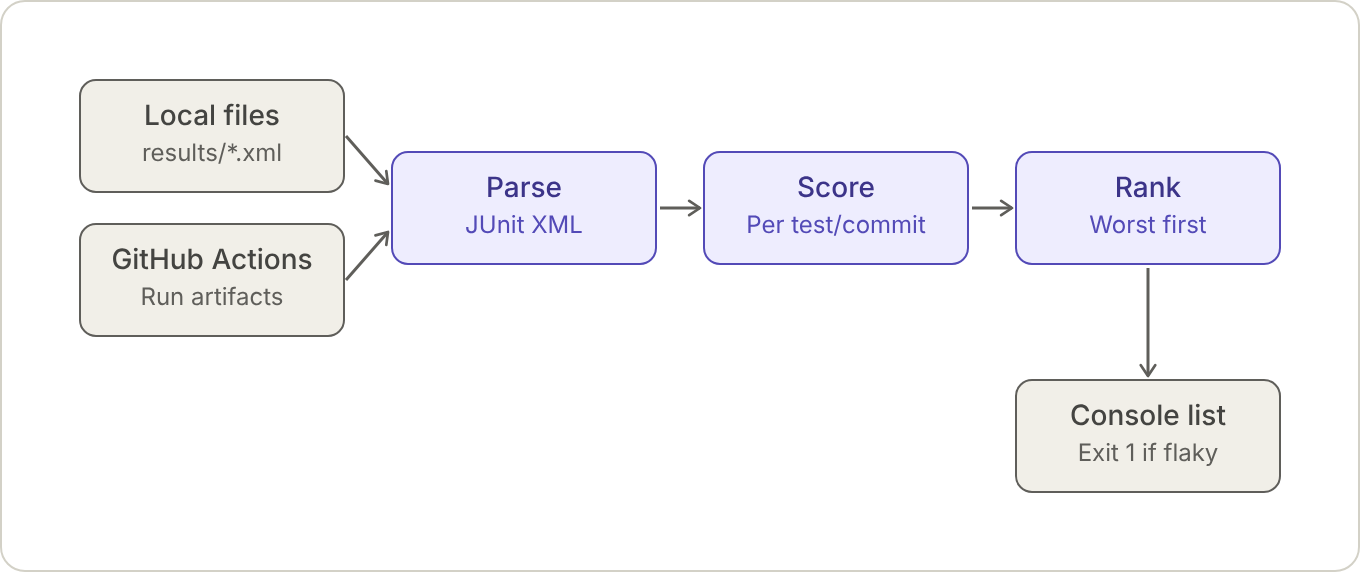
在最初版本中,我只打算解析測試結果、依測試與 commit 計分,然後手動分析:
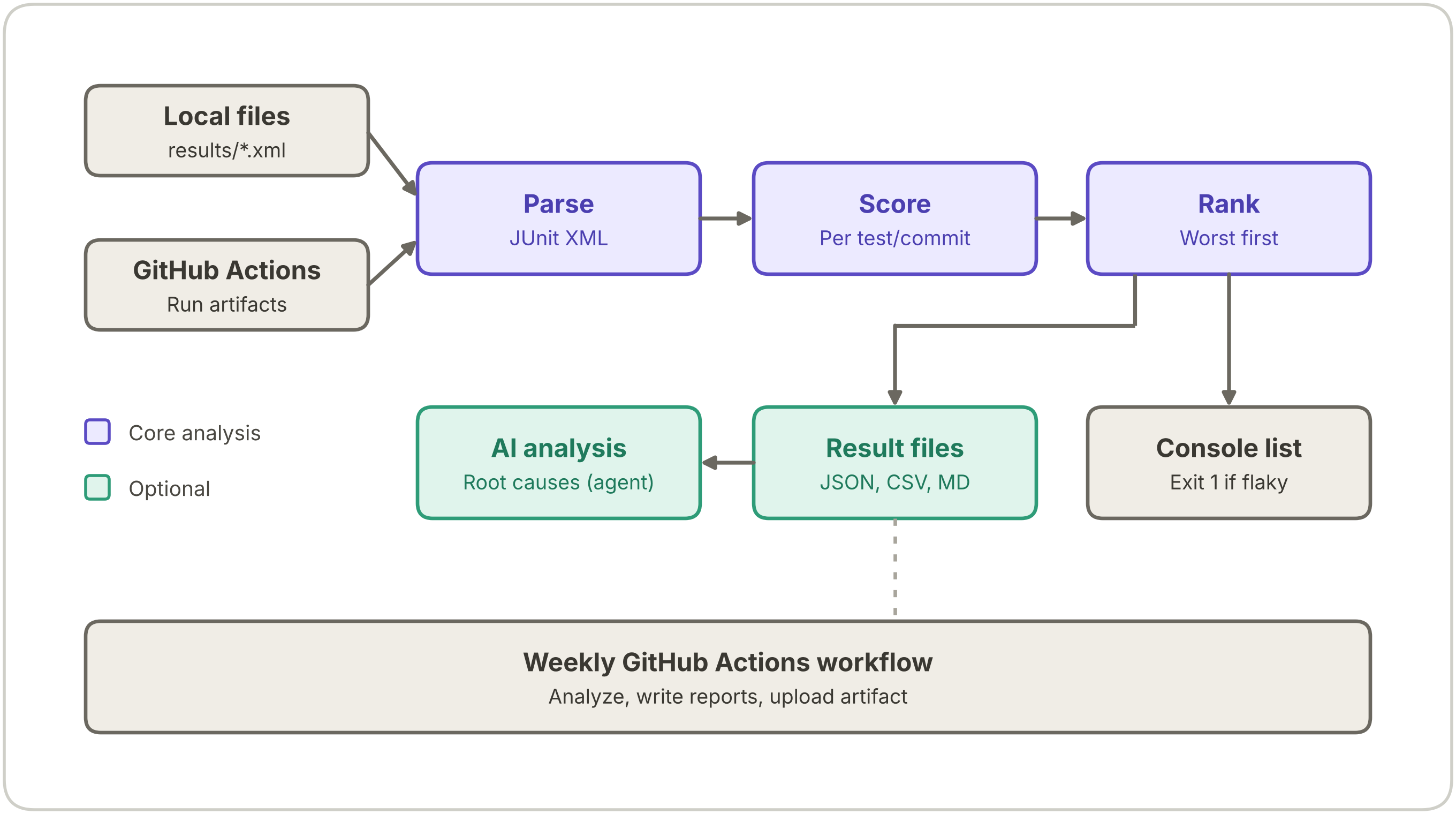
在第一版之後,我想:為什麼不整合 AI 來幫我分析呢?因此,我新增了支援分析與整合 AI 模型的功能。現在,解決方案長這樣:
專案結構如下:
flaky-test-detector/
├── .github/workflows/
│   └── flaky-report.yml   # 每週分析 + 結果檔案
├── agents/
│   └── agent.py           # 可選的 AI 代理:報告的根因分析
├── docs/
│   └── how-it-works.svg   # 這份 README 使用的圖示
├── flaky_detector/
│   ├── __init__.py
│   ├── __main__.py        # CLI
│   ├── parsers.py         # JUnit XML 解析器
│   ├── github.py          # 從 GitHub Actions 取得 JUnit 成品
│   ├── scoring.py         # 不穩定性計分與排序
│   └── report.py          # 結果檔案(JSON / CSV / Markdown)
├── scripts/
│   └── generate_junit.py  # 產生範例 JUnit XML 檔案
├── results/               # 範例 JUnit XML 檔案(git 忽略)
├── reports/               # 產生的報告與 AI 分析
├── tests/
├── pyproject.toml         # 專案中繼資料與開發相依套件(uv)
├── requirements.txt
└── README.md
不穩定測試的計分與排序
先來理解這個專案如何對不穩定測試進行計分與排序。流程從接收 JUnit 格式的 XML 報告開始(大多數測試框架的標準輸出,每個執行過的測試對應一個 <testcase>),而 parsers.py 負責將這份檔案中的資訊解析成正確的格式:
class Outcome(str, Enum):
    PASSED = "passed"
    FAILED = "failed"
    ERROR = "error"
    SKIPPED = "skipped"

@dataclass(frozen=True)
class TestResult:
    """A single test execution in a single CI run."""
    __test__ = False  # keep pytest from trying to collect this class

    name: str  # "<classname>::<name>"
    outcome: Outcome
    commit_sha: str | None
    run_id: str | None
    time: float = 0.0
    message: str | None = None
    source: str | None = None  # file the result came from

    @property
    def passed(self) -> bool:
        return self.outcome is Outcome.PASSED
如果檔案不是有效的 JUnit XML,就會拋出例外;如果有效,就會繼續解析。當呼叫 scoring.py 時,它會使用 FlakinessScorer 類別,負責把 TestResult 物件轉成 TestScore 物件。每筆結果會先依測試名稱分組,再依 commit 分組;對於每一組(測試,commit)配對,評分器會檢查結果。它會忽略:
skipped測試,因為它們無法反映不穩定性;- 沒有
commit_sha屬性(commit ID)的 JUnit 檔案中的結果,因為這些結果無法彼此比較。
failed 與 error 都會被視為失敗。
@dataclass(frozen=True)
class TestScore:
    """Flakiness score of a single test."""
    __test__ = False  # keep pytest from trying to collect this class

    name: str
    commits: int  # this test 有可用資料的 commits 數
    flaky_commits: int  # 這個測試出現混合結果的 commits 數
    commits_where_flaky: tuple[str, ...] = field(default=())
    error_messages: tuple[str, ...] = field(default=())  # 不同的失敗訊息,依首次出現順序排序

    @property
    def score(self) -> float:
        return self.flaky_commits / self.commits if self.commits else 0.0

class FlakinessScorer:
    def score(self, results: Iterable[TestResult]) -> list[TestScore]:
        outcomes: dict[str, dict[str, set[bool]]] = defaultdict(lambda: defaultdict(set))
        messages: dict[str, dict[str, None]] = defaultdict(dict)  # ordered, de-duplicated
        for r in results:
            if not r.commit_sha or r.outcome.value == "skipped":
                continue
            outcomes[r.name][r.commit_sha].add(r.passed)
            if not r.passed and r.message:
                messages[r.name][r.message] = None
        scores = []
        for name, by_commit in outcomes.items():
            flaky = tuple(sorted(sha for sha, seen in by_commit.items() if len(seen) > 1))
            scores.append(
                TestScore(
                    name=name,
                    commits=len(by_commit),
                    flaky_commits=len(flaky),
                    commits_where_flaky=flaky,
                    error_messages=tuple(messages[name]),
                )
            )
        return scores
當同一個 commit 的結果同時出現 {True, False} 時,這個測試就會被標記為不穩定:也就是在相同的程式碼基底下,這個測試有時失敗、有時通過。接著它會產生 Ranker 需要的資料,格式如下:
{
  "name": "tests.checkout.test_cart::test_9",
  "commits": 10,
  "flaky_commits": 3,
  "commits_where_flaky": [
    "gen0007d154385",
    "gen05893e77ff9",
    "gen059095256f8"
  ],
  "error_messages": [
    "AssertionError: timeout waiting for gateway",
    "ConnectionError: connection reset by peer"
  ]
}
當呼叫 FlakinessRanker 類別時,它會使用這些資料來排序測試。它只會考慮至少有 5 個 commit 資料的測試(min_commits),這樣分數才比較可信;當分數達到 0.1 或以上時(threshold),就會將其標記為不穩定。這兩個值都可以調整:
def __init__(self, threshold: float = 0.1, min_commits: int = 5) -> None:
    if not 0.0 <= threshold <= 1.0:
        raise ValueError("threshold must be between 0 and 1")
    if min_commits < 1:
        raise ValueError("min_commits must be >= 1")
    self.threshold = threshold
self.min_commits = min_commits分數的計算方式是:flaky_commits(同一個測試在多少個 commit 上同時出現通過與失敗)的總數,除以該測試在管線中可用的 commits 總數。
這個測試在 10 個 commit 上執行,其中 3 個 commit 內它同時出現通過與失敗。
以這個例子來說,commits 是 10,flaky_commits 是 3,所以分數是 0.3。
有了這個第一版實作,我們已經可以看到初步結果了。我建立了一些 JUnit 報告,並執行下列指令後,得到了這個輸出:
python -m flaky_detector analyze ./results/*.xml --threshold 0.1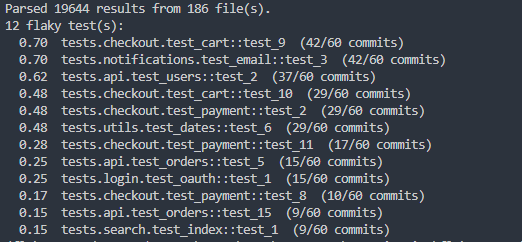
每一行都顯示分數、測試名稱,以及在該測試有資料的 commits 中,出現不穩定的 commit 數量。
報告與 Agent 建立
如前所述,在完成基本功能後,我想:為什麼不再進一步改善呢?第一步是建立結果報告。由於我已經在考慮整合 AI agent,因此報告需要一種很適合它的格式。這份報告由 report.py 產生,支援 JSON、CSV 與 Markdown 格式(透過 --output-dir 選項)。在這篇文章中,我們會聚焦在 JSON 格式,因為 AI agent 會使用它:
{
  "generated_at": "2026-11-10T19:32:23+00:00",
  "source": "local",
  "threshold": 0.1,
  "min_commits": 5,
  "results_parsed": 19644,
  "tests_analyzed": 109,
  "flaky_count": 12,
  "flaky_rate": 0.1101,
  "tests": [
    {
      "name": "tests.checkout.test_cart::test_9",
      "score": 0.7,
      "commits": 60,
      "flaky_commits": 42,
      "is_flaky": true,
      "commits_where_flaky": [
        "gen0007d154385",
        "gen059095256f8"
      ],
      "error_messages": [
        "AssertionError: timeout waiting for gateway",
        "ConnectionError: connection reset by peer",
        "AssertionError: race condition on shared state",
        "AssertionError: expected 200, got 503",
        "TimeoutError: operation timed out after 30s"
      ]
    }
  ]
}
為了建立 AI agent,我使用了 Strands Agents SDK。我第一次接觸這個 SDK 是在 Train the Trainers 工作坊中(感謝 AWS EMEA 的邀請),而且因為設定 agent 的方式非常簡單,所以我決定在這個專案中使用它。
在這個專案中我使用的是 GeminiModel(API 金鑰會從 .env 裡的 GOOGLE_API_KEY 變數讀取),但你可以切換成其他模型;請參考 Model Providers。
from strands import Agent
from strands.models.gemini import GeminiModel

model = GeminiModel(
    client_args={"api_key": api_key},
    model_id="gemini-2.5-flash",
)

agent = Agent(
    model=model,
    tools=[fetch_json_report, export_analysis],
    name="Flaky Test Analysis Agent",
    description="This agent analyzes flaky test reports and provides insights on flaky tests, their scores, trends, and it analyzes the error messages to provide insights on the root causes of flakiness. And when it is asked to summarize the flaky test report, it will use the fetch_json_report tool to retrieve the report data and then provide a summary of how many tests are flaky and which are the worst and the possible root causes based on the error messages.",
    system_prompt="You are a helpful assistant that analyzes flaky test reports. Use the fetch_json_report tool to retrieve report data when needed. Always read the error_messages of each flaky test and infer the possible root causes (timeouts, race conditions, network/gateway instability, shared state, etc.), saying which tests each cause affects and how confident you are. After you finish analysing, call export_analysis once with summary, root_causes and recommendations to save the Markdown report, then tell the user the file path.",
)
建立 agent 時,我們需要提供它工具,讓它能夠完成工作。對這個應用程式來說,我建立了兩個工具:
fetch_json_report:擷取產生出的 JSON 報告。它負責依據時間戳記或期間找出檔案,並以單一回應傳回,順序由最早到最新。export_analysis:將 AI 進行的分析儲存成 Markdown 檔案。
有了這些,就可以呼叫 agent 來執行分析:
def main() -> None:
    parser = argparse.ArgumentParser(description="Analyze flaky test reports with an AI agent.")
    parser.add_argument("period", nargs="?", default="last_24_hours", choices=list(PERIODS),
                        help="period of reports to analyze (default: %(default)s)")
    args = parser.parse_args()
    label = args.period.replace("_", " ")
    agent(f"Summarize the flaky test reports from the {label} (period={args.period}): "
          "how many tests are flaky and which are the worst? After finishing, analyze the error messages to infer the possible root causes of flakiness and give recommendations to fix them. And create the report file with export_analysis tool, then tell me the path of the Markdown file that was written.")

if __name__ == "__main__":
    main()
期間會以參數傳入(例如 python agents/agent.py last_7_days),而 agent 會產出像這樣的報告:Flaky Tests Analysis - Last 24 Hours。

這可以拿來做什麼
好了,現在我們已經可以辨識不穩定測試,甚至可以分析它們了。那我可以拿這個做什麼?首先,你可以開始在團隊中導入它。監控測試並標記不穩定的測試,有助於提升團隊對所打造產品的信任、降低 CI 成本,並避免真正的 bug 因為第二次或第三次執行時測試通過而被忽略。
那麼什麼時候該執行這個工具?這取決於你的團隊運作方式:
- 如果你的團隊採用持續部署,每天或每週都會部署一次,那麼每週執行一次會很有幫助。如果你在較低層環境合併 PR 時有問題,也能幫助你了解發生了什麼事。
- 如果你沒有持續部署,而是每月部署一次,我建議你在每次部署時都執行,並且永遠比較最新的執行結果,看看數量有沒有增加。
- AI 分析是可選的。你可以只執行 Score 和 Rank 的步驟,然後在每個週期結束時、每個月甚至每季,再使用 agent 取得回饋。
限制與整合
- 目前,JUnit XML 檔案必須包含
<property name="commit_sha" value=""/>(commit id)以及<property name="run_id" value=""/>。由於這個解決方案是以 GitHub Actions 為設計前提,因此對其他框架與管線可能需要修改。當結果是從 GitHub Actions(--repo)取得時,這兩個值都會直接取自 GitHub run 本身。 - 已經有一個可與 GitHub Actions 整合的 workflow(
.github/workflows/flaky-report.yml)。它會在每週一執行、產生報告,並將報告上傳為 artifact。如果你打算把它加到自己的 workflow 中,可能需要調整,而被分析的 repository 必須將 JUnit XML 檔案以 workflow artifact 的形式發布。 - 至於 AI 模型,你可以設定自己喜歡的模型。記得查看 Model Providers 來依照你的情境調整。
- 另一個建議是整合像 Grafana 這類的報表工具,這樣你就能看到不穩定測試在不同時間點的行為,以及它們是否正在減少。
結論
不穩定測試不只是惱人而已:它們會削弱團隊對測試的信任,並掩蓋真正的失敗。量化它們是處理它們的第一步,而每個測試、每個 commit 的簡單分數就足以開始。AI 分析可以讓你初步看見可能的根因,但它不能取代人類對結果的檢視,因為由基礎設施造成的失敗也可能看起來像不穩定。試著用看看,觀察你自己的管線會如何表現吧!
1) --- 會變成分隔線(上一行必須是空白)
2) # 會變成一級標題
3) ## 會變成二級標題
4) ### 會變成三級標題
5) **粗體文字**會顯示粗體文字
6) ```當第一行與最後一行會顯示程式碼
7) 請搜尋 Markdown 語法,了解各種格式


