🔧 阿川の電商水電行
Shopify 顧問、維護與客製化
💡
小任務 / 單次支援方案
單次處理 Shopify 修正/微調
⭐️
維護方案
每月 Shopify 技術支援 + 小修改 + 諮詢
🚀
專案建置
Shopify 功能導入、培訓 + 分階段交付


Gemini3 發布!
好像聽說 Gemini3 已經發布。據說在前端界的 UI 設計上很強。不過我的專業是後端,所以可能關聯不大吧。
...呃,單次提示(single prompt)就能製作遊戲嗎!?
於是,我便開始檢驗使用 Gemini3 是否真的能夠製作遊戲。
步驟
1. 訪問 Google AI Studio
從以下連結訪問
https://aistudio.google.com/
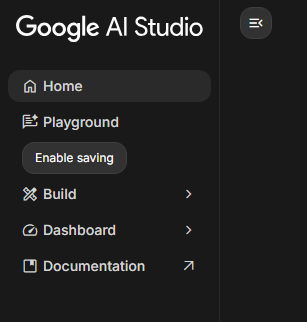
2. 選擇 Build
從左側列表中選擇 "Build"
3. 選擇模型 "Gemini 3 Pro Preview"
預設情況下應該是啟用了 Gemini 3。
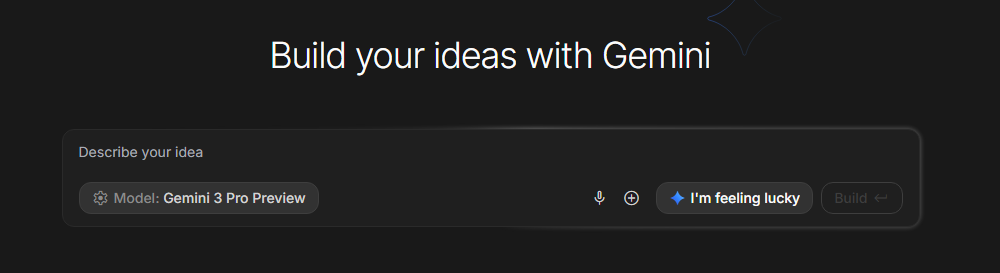
4. 輸入提示
這是最困難的部分。在原始影片中,投入了如下的長提示。
___

Prompt: ""Create a polished, retro-futuristic 3D spaceship web game contained entirely within a single HTML file using Three.js. The game should feature a """"Synthwave/Retrowave"""" aesthetic with the following specifications:

1. Visual Style & Atmosphere
*Aesthetic:* Dark, immersive 3D environment with a glowing, volumetric neon look. Use a color palette of deep purples, hot pinks, and electric cyans.
*Post-Processing:* You must implement Three.js `EffectComposer` with `UnrealBloomPass` to make the neon elements glow intensely.
*Environment:*
A dense, moving starfield background with rich features. Go beyond simple plane shapes here and apply shaders to make the game visually appealing. For example, simulating retro astra, stars, and planets in the background.
Distance fog to fade distant objects smoothly into the darkness.
*Assets:* Use complex geometric primitives constructed programmatically (no external model imports).

2. Gameplay Mechanics
*Perspective:* Third-person view from behind the spaceship.
*Core Loop:* The player pilots the ship on the X and Y axis (2D plane) while enemies (neon blocks) spawn in the distance and fly toward the camera along the Z-axis.
*Combat:*
The player shoots laser bolts (glowing lines) to destroy enemies.
*Collision:* When a laser hits a block, the block should shatter into a very complex particle explosion effect.
*Game Over:* If a block hits the ship, the game ends.
*UI:* A minimal HUD displaying the current Score. A """"Game Over"""" overlay with a """"Restart"""" button.

3. Controls (Cross-Platform)
The game must detect the device type or input method:
*Desktop/Web:*
Use *Arrow Keys* or *WASD* for smooth movement (apply `lerp` or friction for a floaty, drift-like spaceship feel).
Use *Spacebar* to fire.
*Mobile/Touch:*
Render a semi-transparent *Virtual Joystick* on the bottom-left of the screen (using HTML/CSS or Canvas API) to map touch movement to ship coordinates.
Detect a *Tap* anywhere on the right side of the screen to fire lasers.

4. Technical Constraints
*Single File:* All HTML, CSS, and JavaScript (including the Three.js library and post-processing shaders imported via CDN) must be in one `index.html` file. Do not output any other text other than the html response.
*Performance:* Use object pooling for lasers and particles to ensure 60FPS performance.
*Responsiveness:* The canvas must resize dynamically to fit any screen size without stretching the aspect ratio.""

___
看起來需要掌握以下幾點。
- 基本資訊與概覽
- 視覺與風格需求
- 遊戲玩法與機制
- 操作與控制
- 附加要求與特殊指定
細節部分可以之後再調整,先傳達一個粗略的概念來生成應用。
5. 啟動應用!
在 Google AI Studio 內可進行構建並預覽。
※稍後會提到,但非常吃資源。
哦,標題看起來不錯。遊戲開始。
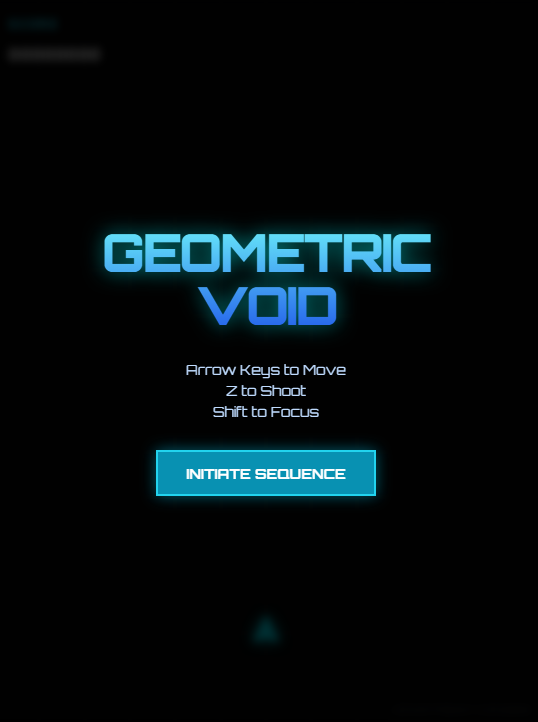
這是一款彈幕射擊遊戲!
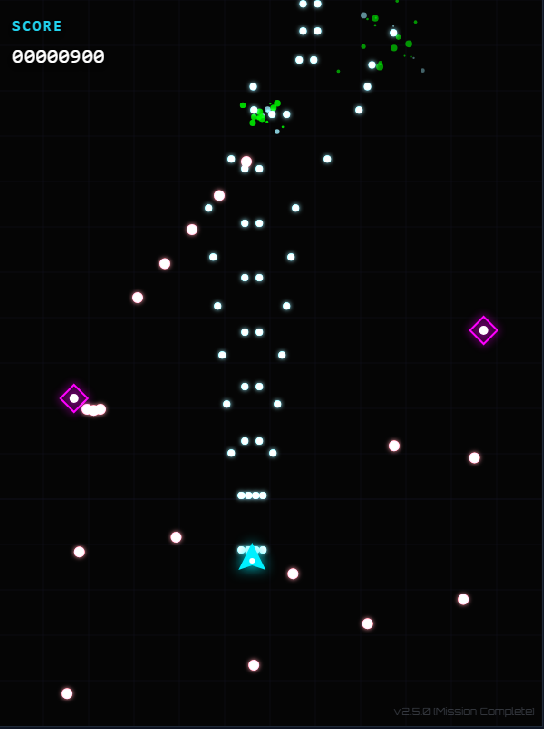
順利生成了一款符合概念的遊戲,且沒有建構錯誤。
而且背景和特效等細節視覺品質也很高。
作為遊戲原型已經非常充足。
查看裡面似乎是用 React 製作的,其他的示範應用也都是 React。
import React from 'react';
import ReactDOM from 'react-dom/client';
import App from './App';

const rootElement = document.getElementById('root');
if (!rootElement) {
  throw new Error("找不到根元素以進行掛載");
}

const root = ReactDOM.createRoot(rootElement);
root.render(
  <React.StrictMode>
    <App />
  </React.StrictMode>
);
總結
- 真的是用一次提示便能製作遊戲
- 而且視覺效果也相當精緻,品質高
- 作為遊戲或前端畫面的原型開發,Gemini3 非常強大
- 不過 Google AI Studio 的預覽非常吃資源。有意想在示範應用中進行流暢操作的人,建議在本地下載並進行構建與部署。
附註
之後我還與 Google AI Studio 進行了幾次對話,構建了一個 Boss 戰的元素。
你可以從這裡在瀏覽器中遊玩。
https://geekman4040.itch.io/danmaku-proto
原文出處:https://qiita.com/geekman4040/items/fdbf1e71b16d6f6f1a8d
共有 0 則留言
文字內容提供幾種功能:
1) --- 會變成分隔線(上一行必須是空白)
2) # 會變成一級標題
3) ## 會變成二級標題
4) ### 會變成三級標題
5) **粗體文字**會顯示粗體文字
6) ```當第一行與最後一行會顯示程式碼
7) 請搜尋 Markdown 語法,了解各種格式
1) --- 會變成分隔線(上一行必須是空白)
2) # 會變成一級標題
3) ## 會變成二級標題
4) ### 會變成三級標題
5) **粗體文字**會顯示粗體文字
6) ```當第一行與最後一行會顯示程式碼
7) 請搜尋 Markdown 語法,了解各種格式
熱門文章


🔧 阿川の電商水電行
Shopify 顧問、維護與客製化
💡
小任務 / 單次支援方案
單次處理 Shopify 修正/微調
⭐️
維護方案
每月 Shopify 技術支援 + 小修改 + 諮詢
🚀
專案建置
Shopify 功能導入、培訓 + 分階段交付