

TLDR - 我完成了一個小專案,想分享給 DEV 上的朋友們,它可以把你的粉絲數顯示在你的 GitHub 上!
<hr>
我在去年開始做這個胡鬧的小玩意兒,跟很多愚蠢的 side project 一樣,最後也就擱置了。但每天我的 email 都會固定收到一個小提醒:「Github Actions 執行失敗...」😂
我當時心想,那我乾脆全刪掉就好了。但這件事讓我很在意。我應該有辦法把它修好,對吧?今天我下定決心,受夠那些煩人的 email 了,我要把它修好。稍微調整一下呼叫 API 的方式,再刪掉一些我曾經註解掉、沒在用的程式碼後,事情就開始變得清楚多了。
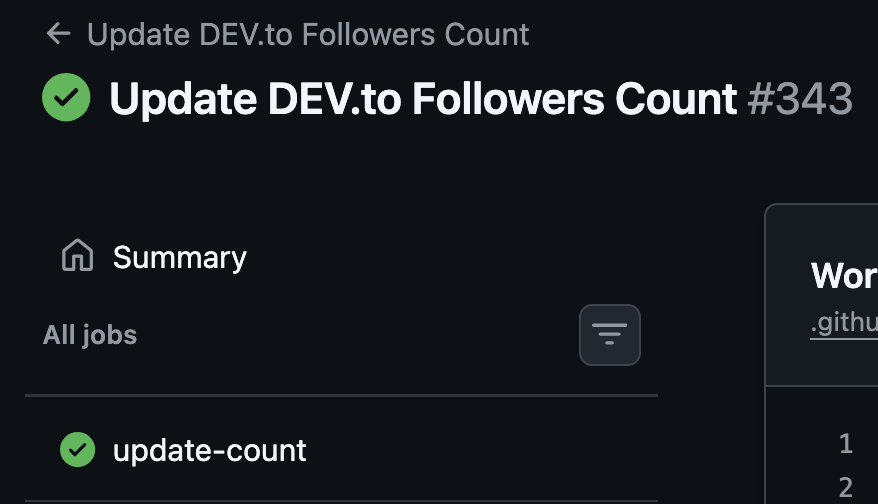
我會分享我現在可正常運作的 github actions 檔案完整程式碼,這樣如果這裡有人也想要用,就不用像我一樣默默忍受一整年的煩人 email 了。這點可以從成功執行的第 #343 次紀錄看出來——那是第一次成功執行。
<hr>
這就是你一直在找的重點。
YAML 檔案:
name: Update DEV.to Followers Count

on:
  schedule:
    # 每天 UTC 午夜執行
    - cron: '0 0 * * *'
  workflow_dispatch:

permissions:
  contents: write

jobs:
  update-count:
    runs-on: ubuntu-latest
    steps:
      - name: Checkout repository
        uses: actions/checkout@v4

      - name: Set up Node.js
        uses: actions/setup-node@v4
        with:
          node-version: '22'

      - name: Run the update script
        env:
          DEVTO_API_KEY: ${{ secrets.DEVTO_API_KEY }}
          DEVTO_USERNAME: annavi11arrea1
        run: node update_script.js

      - name: Commit updated README
        run: |
          if git diff --quiet -- README.md; then
            echo "Follower count has not changed."
            exit 0
          fi
          git config user.name "github-actions[bot]"
          git config user.email "41898282+github-actions[bot]@users.noreply.github.com"
          git add README.md
          git commit -m "Update DEV.to follower count"
          git push
備註:
-
請記得在你的程式碼中使用環境變數來放 API 金鑰,不要把它們直接硬寫進去!我們要維持免費使用 DEV API 的權利。🦋
-
你需要指定 README.md 裡要把輸出放在哪裡。你需要使用適當的標記。我是這樣做的:
<sub>捲動一下,你會看到完整內容,裡面有 start 和 end 標記。</sub>
<!-- DEVTO-FOLLOWERS-COUNT:START -->**34996** DEV.to followers<!-- DEVTO-FOLLOWERS-COUNT:END --><hr>
我真的超興奮這個東西終於能運作了。我不是來炫耀我的粉絲數的,但我們都可能想在自己的個人檔案上默默炫耀一下,哈哈。
做了幾個重要修改:確保我給了寫入權限,還有在工作執行時能自動推送寫入內容。這才是實際更新的關鍵因素。嗯,我在想,GitHub Actions 還能拿來做哪些自動更新呢?
<hr>
感謝 @fm 指正我。這裡是我更新後的 update_script.js 😂
const fs = require("fs");
const https = require("https");

const DEVTO_API_KEY = process.env.DEVTO_API_KEY;
const DEVTO_USERNAME = process.env.DEVTO_USERNAME || "annavi11arrea1";
const README_FILE = "README.md";
const START_MARKER = "<!-- DEVTO-FOLLOWERS-COUNT:START -->";
const END_MARKER = "<!-- DEVTO-FOLLOWERS-COUNT:END -->";
const USER_AGENT = "AnnaVi11arrea1-GitHub-Actions";

if (!DEVTO_API_KEY) {
  throw new Error("Missing required DEVTO_API_KEY environment variable.");
}

const parseResponsePreview = (data) => {
  const trimmed = data.trim();
  return trimmed ? trimmed.slice(0, 500) : "<empty>";
};

const fetchJson = (path) => {
  const options = {
    hostname: "dev.to",
    port: 443,
    path,
    method: "GET",
    headers: {
      "api-key": DEVTO_API_KEY,
      Accept: "application/vnd.forem.api-v1+json",
      "User-Agent": USER_AGENT,
    },
    timeout: 15000,
  };

  return new Promise((resolve, reject) => {
    const req = https.request(options, (res) => {
      let data = "";

      res.on("data", (chunk) => {
        data += chunk;
      });

      res.on("end", () => {
        if (res.statusCode !== 200) {
          const preview = parseResponsePreview(data);
          reject(
            new Error(
              `DEV.to API request failed (${res.statusCode} ${res.statusMessage || "Unknown"}). Response preview: ${preview}`
            )
          );
          return;
        }

        try {
          resolve(JSON.parse(data));
        } catch (error) {
          reject(new Error(`Failed to parse API response. Response data: ${data}`));
        }
      });
    });

    req.on("timeout", () => req.destroy(new Error("DEV.to API request timed out.")));
    req.on("error", reject);
    req.end();
  });
};

const getFollowersCount = async () => {
  const perPage = 1000;
  let page = 1;
  let totalCount = 0;

  while (true) {
    const followers = await fetchJson(
      `/api/followers/users?page=${page}&per_page=${perPage}`
    );

    if (!Array.isArray(followers)) {
      throw new Error("DEV.to followers endpoint returned an invalid response.");
    }

    totalCount += followers.length;

    if (followers.length < perPage) {
      return totalCount;
    }

    page += 1;
  }
};

const updateReadme = async () => {
  const count = await getFollowersCount();
  let readmeContent = fs.readFileSync(README_FILE, "utf8");
  const newContent = `${START_MARKER}**${count}** DEV.to followers${END_MARKER}`;

  const regex = new RegExp(`${START_MARKER}[\\s\\S]*?${END_MARKER}`, "g");
  readmeContent = readmeContent.replace(regex, newContent);

  fs.writeFileSync(README_FILE, readmeContent);
  console.log("README updated with new follower count:", count);
};

updateReadme().catch((error) => {
  console.error(error);
  process.exit(1);
});

---

原文出處:https://dev.to/annavi11arrea1/sharing-dev-followers-count-on-github-profile-bj3共有 0 則留言
文字內容提供幾種功能:
1) --- 會變成分隔線(上一行必須是空白)
2) # 會變成一級標題
3) ## 會變成二級標題
4) ### 會變成三級標題
5) **粗體文字**會顯示粗體文字
6) ```當第一行與最後一行會顯示程式碼
7) 請搜尋 Markdown 語法,了解各種格式
1) --- 會變成分隔線(上一行必須是空白)
2) # 會變成一級標題
3) ## 會變成二級標題
4) ### 會變成三級標題
5) **粗體文字**會顯示粗體文字
6) ```當第一行與最後一行會顯示程式碼
7) 請搜尋 Markdown 語法,了解各種格式
熱門文章


