

家裡有朋友來的時候,幾乎每次都會這樣。
- 「可以告訴我Wi-Fi密碼嗎?」
- 「沒問題!這是密碼!」
- 「謝謝!(輸入…)欸,連不上去、、、」
- 「欸,這裡可能有一個字錯了」
我總是覺得有點麻煩。
口頭傳遞的方法也麻煩,所以我想乾脆換一個奇怪的分享方式,決定用QR碼來分享Wi-Fi密碼。
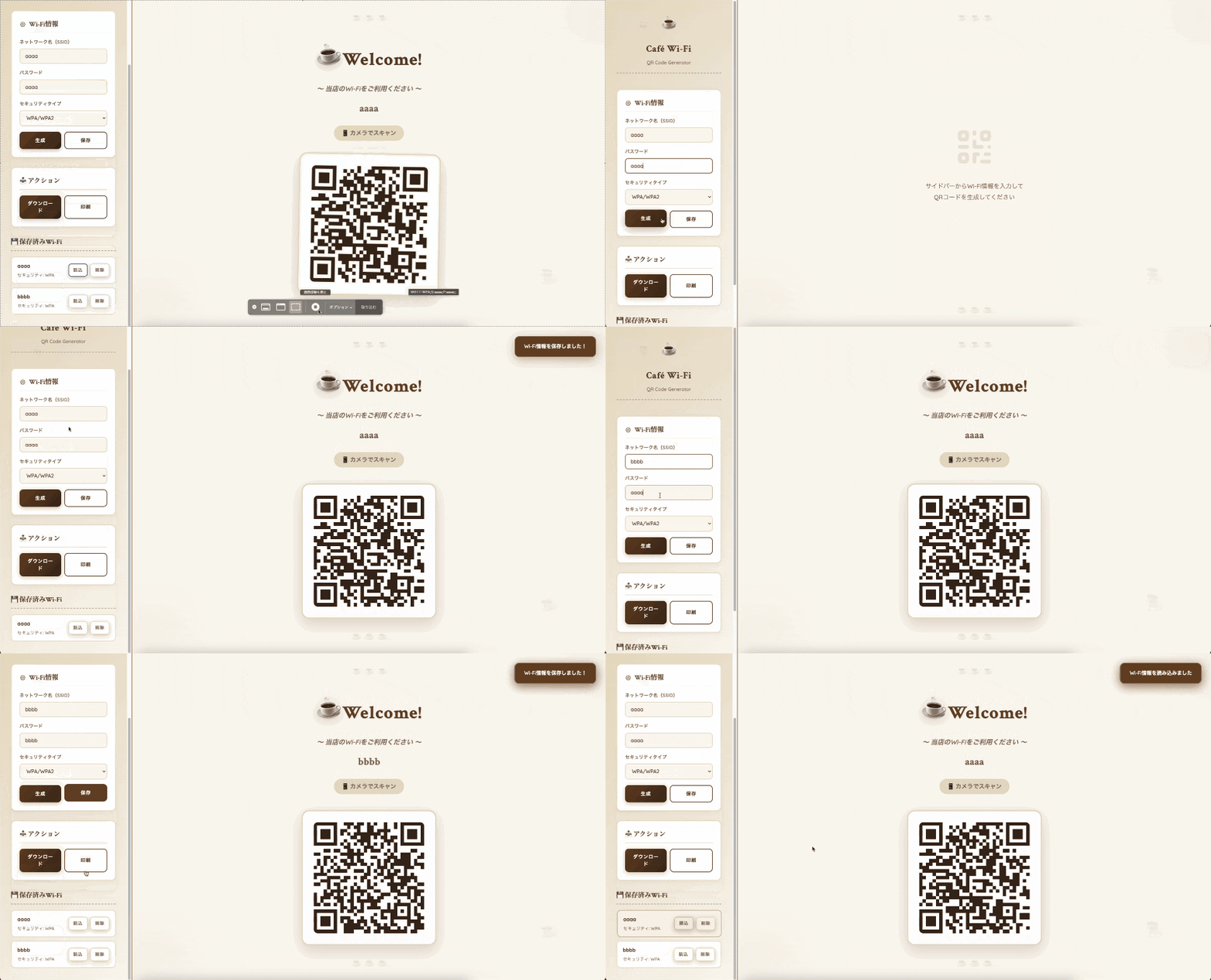
2. 成品就是這個!
雖然在家裡真的沒什麼必要,但我覺得這樣設計得蠻有型的。
3. 實作
3.1. 整體程式碼
<details><summary>整體程式碼在這裡</summary>
<!DOCTYPE html>
<html lang="zh-Hant">
<head>
<meta charset="UTF-8">
<meta name="viewport" content="width=device-width, initial-scale=1.0">
<title>Wi-Fi QR碼生成器 - 咖啡風格</title>
<script src="https://cdnjs.cloudflare.com/ajax/libs/qrcodejs/1.0.0/qrcode.min.js"></script>
<link rel="preconnect" href="https://fonts.googleapis.com">
<link rel="preconnect" href="https://fonts.gstatic.com" crossorigin>
<link href="https://fonts.googleapis.com/css2?family=Crimson+Text:wght@400;600;700&family=Quicksand:wght@400;500;600;700&display=swap" rel="stylesheet">
<style>
:root {
--cream: #faf7f0;
--coffee: #6b4423;
--light-coffee: #a0745f;
--dark-coffee: #3d2817;
--espresso: #2d1810;
--foam: #ffffff;
--caramel: #d4a574;
--latte: #e8dcc4;
--mocha: #8b6f47;
}
* {
margin: 0;
padding: 0;
box-sizing: border-box;
}
body {
font-family: 'Quicksand', sans-serif;
background: var(--cream);
color: var(--coffee);
min-height: 100vh;
line-height: 1.6;
position: relative;
overflow-x: hidden;
}
/* 咖啡豆背景圖案 */
body::before {
content: '☕';
position: fixed;
top: 5%;
left: 5%;
font-size: 3rem;
opacity: 0.05;
animation: float 6s ease-in-out infinite;
}
body::after {
content: '☕';
position: fixed;
bottom: 10%;
right: 8%;
font-size: 4rem;
opacity: 0.05;
animation: float 8s ease-in-out infinite 2s;
}
@keyframes float {
0%, 100% { transform: translateY(0px) rotate(0deg); }
50% { transform: translateY(-20px) rotate(10deg); }
}
.container {
max-width: 100%;
height: 100vh;
margin: 0;
padding: 0;
display: flex;
animation: fadeIn 0.8s ease-out;
}
@keyframes fadeIn {
from { opacity: 0; }
to { opacity: 1; }
}
.sidebar {
width: 420px;
background: linear-gradient(135deg, var(--latte) 0%, var(--cream) 100%);
border-right: 3px solid var(--caramel);
padding: 40px 35px;
overflow-y: auto;
display: flex;
flex-direction: column;
gap: 30px;
box-shadow: 5px 0 20px rgba(107, 68, 35, 0.1);
}
.sidebar-header {
text-align: center;
margin-bottom: 20px;
padding-bottom: 20px;
border-bottom: 2px dashed var(--caramel);
}
.cafe-logo {
font-size: 3rem;
margin-bottom: 15px;
animation: steam 2s ease-in-out infinite;
display: inline-block;
}
@keyframes steam {
0%, 100% { transform: translateY(0px); }
50% { transform: translateY(-5px); }
}
.sidebar-header h1 {
font-family: 'Crimson Text', serif;
font-size: 1.8rem;
font-weight: 700;
color: var(--coffee);
margin-bottom: 8px;
letter-spacing: 1px;
}
.sidebar-header p {
font-size: 0.95rem;
color: var(--light-coffee);
font-weight: 500;
}
.main-display {
flex: 1;
display: flex;
align-items: center;
justify-content: center;
padding: 60px;
background: var(--cream);
position: relative;
overflow: hidden;
}
/* 咖啡漬裝飾 */
.coffee-stain {
position: absolute;
border-radius: 50%;
opacity: 0.03;
}
.coffee-stain-1 {
width: 300px;
height: 300px;
background: radial-gradient(circle, var(--coffee) 0%, transparent 70%);
top: -100px;
right: -100px;
}
.coffee-stain-2 {
width: 400px;
height: 400px;
background: radial-gradient(circle, var(--mocha) 0%, transparent 70%);
bottom: -150px;
left: -150px;
}
@media (max-width: 1024px) {
.container {
flex-direction: column;
height: auto;
}
.sidebar {
width: 100%;
border-right: none;
border-bottom: 3px solid var(--caramel);
}
.main-display {
min-height: 70vh;
padding: 40px 20px;
}
}
.section {
background: var(--foam);
border-radius: 15px;
padding: 25px;
border: 2px solid var(--latte);
box-shadow: 0 4px 15px rgba(107, 68, 35, 0.08);
}
.section h2 {
font-family: 'Crimson Text', serif;
font-size: 1.3rem;
margin-bottom: 18px;
color: var(--coffee);
display: flex;
align-items: center;
gap: 10px;
font-weight: 600;
border-bottom: 1px solid var(--latte);
padding-bottom: 10px;
}
.icon {
width: 20px;
height: 20px;
color: var(--mocha);
}
.form-group {
margin-bottom: 18px;
}
label {
display: block;
margin-bottom: 8px;
color: var(--light-coffee);
font-weight: 600;
font-size: 0.9rem;
text-transform: uppercase;
letter-spacing: 0.5px;
}
input, select {
width: 100%;
padding: 12px 16px;
background: var(--cream);
border: 2px solid var(--latte);
border-radius: 10px;
color: var(--coffee);
font-size: 1rem;
font-family: 'Quicksand', sans-serif;
font-weight: 500;
transition: all 0.3s ease;
}
input:focus, select:focus {
outline: none;
border-color: var(--mocha);
box-shadow: 0 0 0 3px rgba(160, 116, 95, 0.1);
background: var(--foam);
}
input::placeholder {
color: var(--light-coffee);
opacity: 0.6;
}
.button-group {
display: flex;
gap: 10px;
margin-top: 18px;
}
button {
flex: 1;
padding: 14px 22px;
background: linear-gradient(135deg, var(--coffee) 0%, var(--dark-coffee) 100%);
color: var(--foam);
border: none;
border-radius: 12px;
font-size: 0.95rem;
font-weight: 700;
cursor: pointer;
transition: all 0.3s ease;
text-transform: uppercase;
letter-spacing: 1px;
font-family: 'Quicksand', sans-serif;
box-shadow: 0 4px 15px rgba(107, 68, 35, 0.3);
}
button:hover {
transform: translateY(-3px);
box-shadow: 0 8px 25px rgba(107, 68, 35, 0.4);
}
button:active {
transform: translateY(-1px);
}
button.secondary {
background: transparent;
border: 2px solid var(--coffee);
color: var(--coffee);
box-shadow: none;
}
button.secondary:hover {
background: var(--coffee);
color: var(--foam);
}
#qrcode-container {
display: flex;
flex-direction: column;
align-items: center;
justify-content: center;
z-index: 1;
}
.welcome-section {
text-align: center;
margin-bottom: 50px;
animation: fadeInDown 1s ease-out;
}
@keyframes fadeInDown {
from {
opacity: 0;
transform: translateY(-40px);
}
to {
opacity: 1;
transform: translateY(0);
}
}
.welcome-icon {
font-size: 5rem;
margin-bottom: 25px;
display: inline-block;
filter: drop-shadow(0 8px 16px rgba(107, 68, 35, 0.2));
animation: wiggle 3s ease-in-out infinite;
}
@keyframes wiggle {
0%, 100% { transform: rotate(-5deg); }
50% { transform: rotate(5deg); }
}
.welcome-message {
font-family: 'Crimson Text', serif;
font-size: 3.5rem;
font-weight: 700;
color: var(--coffee);
margin-bottom: 15px;
text-shadow: 2px 2px 4px rgba(107, 68, 35, 0.1);
position: relative;
display: inline-block;
letter-spacing: 2px;
}
.welcome-subtitle {
font-size: 1.3rem;
color: var(--light-coffee);
font-weight: 600;
margin-bottom: 20px;
font-style: italic;
}
.wifi-name-display {
font-size: 2rem;
color: var(--mocha);
font-weight: 700;
margin-bottom: 10px;
font-family: 'Crimson Text', serif;
}
.instruction-text {
font-size: 1.15rem;
color: var(--light-coffee);
margin-top: 18px;
font-weight: 600;
background: var(--latte);
padding: 10px 25px;
border-radius: 25px;
display: inline-block;
}
#qrcode {
padding: 35px;
background: var(--foam);
border-radius: 25px;
box-shadow: 0 15px 50px rgba(107, 68, 35, 0.2);
z-index: 1;
transition: transform 0.5s ease;
animation: fadeInUp 1.2s ease-out;
border: 4px solid var(--latte);
}
@keyframes fadeInUp {
from {
opacity: 0;
transform: translateY(40px);
}
to {
opacity: 1;
transform: translateY(0);
}
}
#qrcode:hover {
transform: scale(1.05) rotate(1deg);
}
#qrcode canvas, #qrcode img {
border-radius: 12px;
}
.empty-state {
text-align: center;
color: var(--light-coffee);
animation: pulse 2s ease-in-out infinite;
}
.empty-state svg {
width: 140px;
height: 140px;
margin-bottom: 30px;
opacity: 0.15;
color: var(--mocha);
}
.empty-state p {
font-size: 1.2rem;
line-height: 1.8;
font-weight: 500;
}
.saved-wifi h2 {
font-family: 'Crimson Text', serif;
font-size: 1.3rem;
margin-bottom: 18px;
color: var(--coffee);
font-weight: 700;
border-bottom: 2px dashed var(--caramel);
padding-bottom: 10px;
}
.wifi-list {
display: flex;
flex-direction: column;
gap: 12px;
}
.wifi-item {
background: var(--foam);
border: 2px solid var(--latte);
border-radius: 12px;
padding: 15px 18px;
display: flex;
justify-content: space-between;
align-items: center;
transition: all 0.3s ease;
cursor: pointer;
}
.wifi-item:hover {
border-color: var(--mocha);
background: var(--latte);
transform: translateX(5px);
box-shadow: 0 4px 12px rgba(107, 68, 35, 0.15);
}
.wifi-info h3 {
font-size: 1rem;
margin-bottom: 4px;
color: var(--coffee);
font-weight: 700;
}
.wifi-info p {
font-size: 0.85rem;
color: var(--light-coffee);
font-weight: 500;
}
.wifi-actions {
display: flex;
gap: 8px;
}
.icon-button {
padding: 8px 14px;
background: transparent;
border: 2px solid var(--latte);
border-radius: 8px;
color: var(--light-coffee);
cursor: pointer;
transition: all 0.3s ease;
font-size: 0.85rem;
font-weight: 600;
}
.icon-button:hover {
border-color: var(--mocha);
color: var(--coffee);
background: var(--latte);
}
.icon-button.delete:hover {
border-color: #c17a4a;
color: #8b4423;
background: #fde5d4;
}
.notification {
position: fixed;
top: 30px;
right: 30px;
padding: 18px 28px;
background: var(--coffee);
color: var(--foam);
border-radius: 15px;
box-shadow: 0 8px 30px rgba(107, 68, 35, 0.4);
animation: slideIn 0.4s ease-out;
z-index: 1000;
font-weight: 600;
border: 2px solid var(--mocha);
}
@keyframes slideIn {
from {
transform: translateX(400px);
opacity: 0;
}
to {
transform: translateX(0);
opacity: 1;
}
}
.print-section {
display: none;
}
@media print {
body {
background: white;
color: var(--coffee);
}
body::before, body::after {
display: none;
}
.container {
display: block;
}
.sidebar, .button-group {
display: none !important;
}
.main-display {
background: white;
padding: 0;
}
.print-section {
display: block;
text-align: center;
padding: 60px 40px;
}
#qrcode-container {
margin: 0 auto;
box-shadow: none;
}
.coffee-stain {
display: none;
}
}
/* 裝飾元素 */
.decoration-top {
position: absolute;
top: 30px;
left: 50%;
transform: translateX(-50%);
font-size: 2rem;
opacity: 0.1;
}
.decoration-bottom {
position: absolute;
bottom: 30px;
left: 50%;
transform: translateX(-50%);
font-size: 2rem;
opacity: 0.1;
}
</style>
</head>
<body>
<div class="container">
<!-- 側邊欄 -->
<div class="sidebar">
<div class="sidebar-header">
<div class="cafe-logo">☕</div>
<h1>咖啡館 Wi-Fi</h1>
<p>QR碼生成器</p>
</div>
<!-- 表單區域 -->
<div class="section">
<h2>
<svg class="icon" fill="none" stroke="currentColor" viewBox="0 0 24 24">
<path stroke-linecap="round" stroke-linejoin="round" stroke-width="2" d="M10.325 4.317c.426-1.756 2.924-1.756 3.35 0a1.724 1.724 0 002.573 1.066c1.543-.94 3.31.826 2.37 2.37a1.724 1.724 0 001.065 2.572c1.756.426 1.756 2.924 0 3.35a1.724 1.724 0 00-1.066 2.573c.94 1.543-.826 3.31-2.37 2.37a1.724 1.724 0 00-2.572 1.065c-.426 1.756-2.924 1.756-3.35 0a1.724 1.724 0 00-2.573-1.066c-1.543.94-3.31-.826-2.37-2.37a1.724 1.724 0 00-1.065-2.572c-1.756-.426-1.756-2.924 0-3.35a1.724 1.724 0 001.066-2.573c-.94-1.543.826-3.31 2.37-2.37.996.608 2.296.07 2.572-1.065z"></path>
<path stroke-linecap="round" stroke-linejoin="round" stroke-width="2" d="M15 12a3 3 0 11-6 0 3 3 0 016 0z"></path>
</svg>
Wi-Fi資訊
</h2>
<form id="wifi-form">
<div class="form-group">
<label for="ssid">網路名稱(SSID)</label>
<input type="text" id="ssid" placeholder="例: Cafe_Guest_WiFi" required>
</div>
<div class="form-group">
<label for="password">密碼</label>
<input type="text" id="password" placeholder="輸入Wi-Fi密碼" required>
</div>
<div class="form-group">
<label for="security">安全類型</label>
<select id="security">
<option value="WPA">WPA/WPA2</option>
<option value="WEP">WEP</option>
<option value="nopass">無(開放)</option>
</select>
</div>
<div class="button-group">
<button type="submit">生成</button>
<button type="button" class="secondary" onclick="saveWiFi()">保存</button>
</div>
</form>
</div>
<!-- 操作區域 -->
<div class="section">
<h2>📥 操作</h2>
<div class="button-group">
<button type="button" onclick="downloadQRCode()">下載</button>
<button type="button" class="secondary" onclick="window.print()">列印</button>
</div>
</div>
<!-- 已保存的Wi-Fi區域 -->
<div class="saved-wifi">
<h2>💾 已保存Wi-Fi</h2>
<div class="wifi-list" id="saved-list"></div>
</div>
</div>
<!-- 主顯示區域 -->
<div class="main-display">
<div class="coffee-stain coffee-stain-1"></div>
<div class="coffee-stain coffee-stain-2"></div>
<div class="decoration-top">☕ ☕ ☕</div>
<div class="decoration-bottom">☕ ☕ ☕</div>
<div id="qrcode-container">
<div class="empty-state">
<svg fill="none" stroke="currentColor" viewBox="0 0 24 24">
<path stroke-linecap="round" stroke-linejoin="round" stroke-width="2" d="M12 4v1m6 11h2m-6 0h-2v4m0-11v3m0 0h.01M12 12h4.01M16 20h4M4 12h4m12 0h.01M5 8h2a1 1 0 001-1V5a1 1 0 00-1-1H5a1 1 0 00-1 1v2a1 1 0 001 1zm12 0h2a1 1 0 001-1V5a1 1 0 00-1-1h-2a1 1 0 00-1 1v2a1 1 0 001 1z"></path>
</svg>
<p>請在側邊欄輸入Wi-Fi資訊<br>生成QR碼</p>
</div>
<div id="qr-display" style="display: none;">
<div class="welcome-section">
<div class="welcome-icon">☕</div>
<div class="welcome-message">歡迎您!</div>
<div class="welcome-subtitle">〜 請使用我們的Wi-Fi 〜</div>
<div class="wifi-name-display" id="display-ssid"></div>
<div class="instruction-text">📱 用相機掃描</div>
</div>
<div id="qrcode"></div>
</div>
</div>
</div>
</div>
<div class="print-section">
<div style="text-align: center; padding: 60px 40px;">
<div style="font-size: 4rem; margin-bottom: 20px;">☕</div>
<h1 style="font-family: 'Crimson Text', serif; font-size: 3rem; color: var(--coffee); margin-bottom: 15px;">歡迎您!</h1>
<p style="font-size: 1.3rem; font-style: italic; color: var(--light-coffee); margin-bottom: 20px;">〜 請使用我們的Wi-Fi 〜</p>
<h2 style="font-family: 'Crimson Text', serif; color: var(--mocha); margin-bottom: 40px; font-size: 2rem;" id="print-ssid"></h2>
<p style="font-size: 1.1rem; color: var(--light-coffee);">請用智能手機的相機掃描此QR碼</p>
</div>
</div>
</body>
<script>
let currentQRCode = null;
let currentWiFiData = null;
// 表單提交時的處理
document.getElementById('wifi-form').addEventListener('submit', function(e) {
e.preventDefault();
generateQRCode();
});
// QR碼生成函數
function generateQRCode() {
const ssid = document.getElementById('ssid').value;
const password = document.getElementById('password').value;
const security = document.getElementById('security').value;
if (!ssid) {
showNotification('請輸入網路名稱', 'error');
return;
}
// Wi-Fi QR碼的格式
let wifiString;
if (security === 'nopass') {
wifiString = `WIFI:T:nopass;S:${ssid};;`;
} else {
wifiString = `WIFI:T:${security};S:${ssid};P:${password};;`;
}
// 保存當前的Wi-Fi數據
currentWiFiData = { ssid, password, security };
// 隱藏空狀態,顯示QR顯示區
document.querySelector('.empty-state').style.display = 'none';
document.getElementById('qr-display').style.display = 'block';
// 顯示SSID
document.getElementById('display-ssid').textContent = ssid;
// 同樣設置用於列印
document.getElementById('print-ssid').textContent = ssid;
// 清除現有的QR碼
const qrcodeElement = document.getElementById('qrcode');
qrcodeElement.innerHTML = '';
// 生成QR碼
currentQRCode = new QRCode(qrcodeElement, {
text: wifiString,
width: 350,
height: 350,
colorDark: '#3d2817',
colorLight: '#ffffff',
correctLevel: QRCode.CorrectLevel.H
});
showNotification('已生成QR碼!');
}
// 保存Wi-Fi資訊
function saveWiFi() {
if (!currentWiFiData) {
showNotification('請先生成QR碼', 'error');
return;
}
let savedWiFis = JSON.parse(localStorage.getItem('savedWiFis') || '[]');
// 檢查重複
const exists = savedWiFis.some(wifi => wifi.ssid === currentWiFiData.ssid);
if (exists) {
showNotification('此Wi-Fi已經被保存了', 'error');
return;
}
savedWiFis.push(currentWiFiData);
localStorage.setItem('savedWiFis', JSON.stringify(savedWiFis));
loadSavedWiFis();
showNotification('Wi-Fi資訊已保存!');
}
// 加載已保存的Wi-Fi
function loadSavedWiFis() {
const savedWiFis = JSON.parse(localStorage.getItem('savedWiFis') || '[]');
const listElement = document.getElementById('saved-list');
if (savedWiFis.length === 0) {
listElement.innerHTML = '<p style="text-align: center; color: var(--light-coffee); padding: 30px; font-size: 0.9rem;">沒有保存的Wi-Fi</p>';
return;
}
listElement.innerHTML = savedWiFis.map((wifi, index) => `
<div class="wifi-item" onclick="loadWiFi(${index})">
<div class="wifi-info">
<h3>${wifi.ssid}</h3>
<p>安全性: ${wifi.security === 'nopass' ? '無' : wifi.security}</p>
</div>
<div class="wifi-actions">
<button class="icon-button" onclick="event.stopPropagation(); loadWiFi(${index})">載入</button>
<button class="icon-button delete" onclick="event.stopPropagation(); deleteWiFi(${index})">刪除</button>
</div>
</div>
`).join('');
}
// 載入Wi-Fi資訊
function loadWiFi(index) {
const savedWiFis = JSON.parse(localStorage.getItem('savedWiFis') || '[]');
const wifi = savedWiFis[index];
document.getElementById('ssid').value = wifi.ssid;
document.getElementById('password').value = wifi.password;
document.getElementById('security').value = wifi.security;
generateQRCode();
showNotification('已載入Wi-Fi資訊');
}
// 刪除Wi-Fi資訊
function deleteWiFi(index) {
if (!confirm('確定要刪除此Wi-Fi資訊嗎?')) return;
let savedWiFis = JSON.parse(localStorage.getItem('savedWiFis') || '[]');
savedWiFis.splice(index, 1);
localStorage.setItem('savedWiFis', JSON.stringify(savedWiFis));
loadSavedWiFis();
showNotification('已刪除Wi-Fi資訊');
}
// 下載QR碼
function downloadQRCode() {
if (!currentQRCode) {
showNotification('請先生成QR碼', 'error');
return;
}
const canvas = document.querySelector('#qrcode canvas');
const image = canvas.toDataURL('image/png');
const link = document.createElement('a');
link.download = `wifi-qr-${currentWiFiData.ssid}.png`;
link.href = image;
link.click();
showNotification('已下載QR碼!');
}
// 顯示通知
function showNotification(message, type = 'success') {
const notification = document.createElement('div');
notification.className = 'notification';
notification.textContent = message;
if (type === 'error') {
notification.style.background = '#c17a4a';
}
document.body.appendChild(notification);
setTimeout(() => {
notification.remove();
}, 3000);
}
// 頁面加載時顯示已保存的Wi-Fi
window.addEventListener('DOMContentLoaded', loadSavedWiFis);
</script>
</details>
### 3.2. 技術要點
#### 3.2.1. Wi-Fi連接用格式生成
Wi-Fi QR碼有標準格式。
WIFI:T:WPA;S:SSID_NAME;P:PASSWORD;;
格式解釋

- `T:` - 安全類型(WPA, WPA2, WEP, nopass)
- `S:` - SSID(網路名稱)
- `P:` - 密碼
- `;;` - 終止符(必填)

在整體程式碼中

```javascript
// 有安全性的情況
wifiString = `WIFI:T:${security};S:${ssid};P:${password};;`;

// 無安全性(開放網路)的情況
wifiString = `WIFI:T:nopass;S:${ssid};;`;
這是一個在Android / iOS都能使用的共通格式。
3.2.2. 使用QRCode.js生成QR圖像
載入外部函式庫
<script src="https://cdnjs.cloudflare.com/ajax/libs/qrcodejs/1.0.0/qrcode.min.js"></script>生成
new QRCode(qrcodeElement, {
    text: wifiString,
    width: 350,
    height: 350,
    colorDark: '#0f172a',
    colorLight: '#ffffff',
    correctLevel: QRCode.CorrectLevel.H
});
3.2.3. 將Wi-Fi資訊保存到本地儲存
可以保存多個SSID並切換使用。
也可以註冊來賓用Wi-Fi和家庭用Wi-Fi。
// 將Wi-Fi資訊添加到陣列並保存
localStorage.setItem('savedWiFis', JSON.stringify(savedWiFis));

// 讀取已保存的資訊
const savedWiFis = JSON.parse(localStorage.getItem('savedWiFis') || '[]');
4. 附加
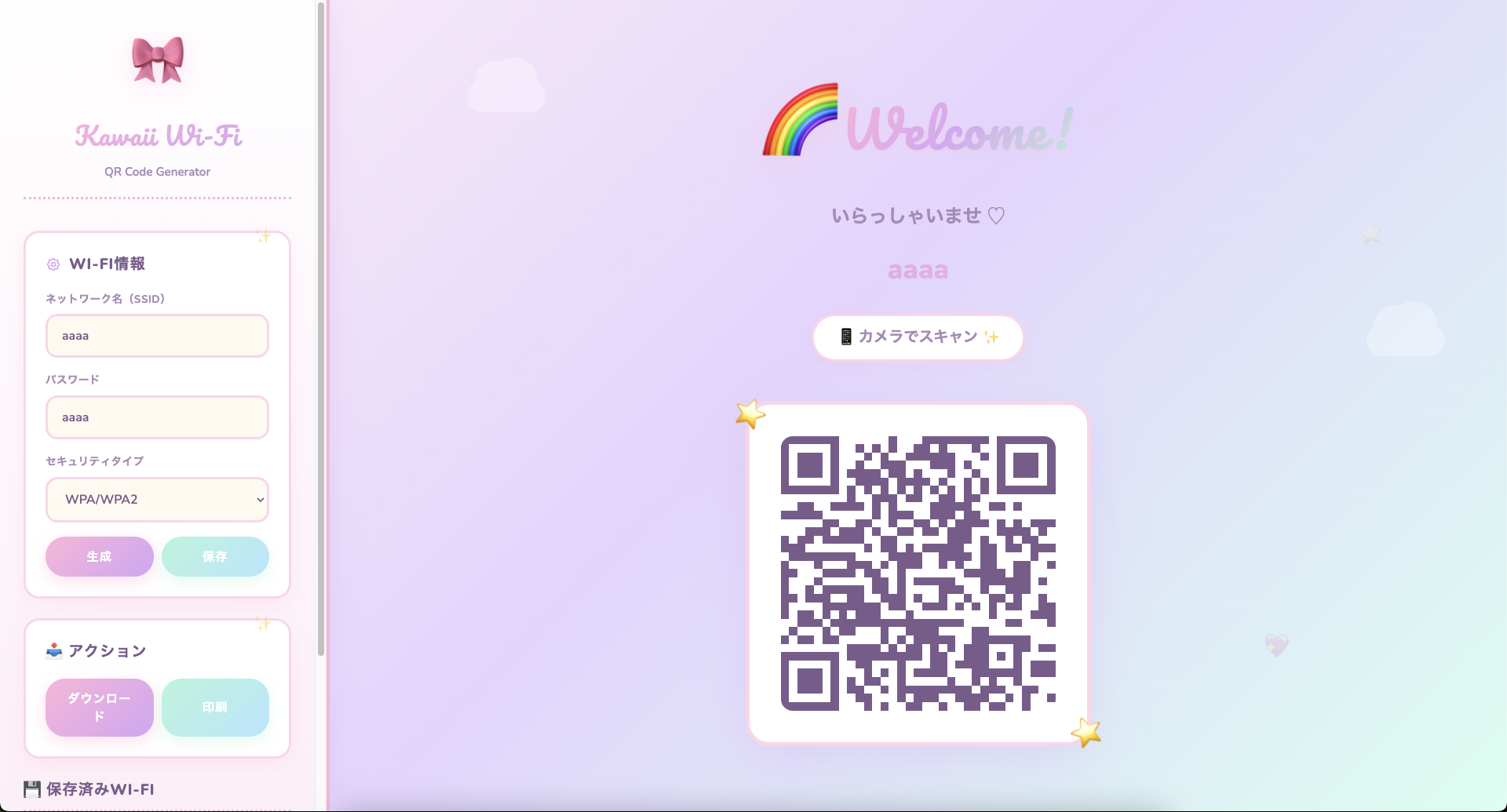
我還做了一些可愛的東西。
5. 總結
這次我製作了頁面,以解決分享Wi-Fi密碼的麻煩。
原文出處:https://qiita.com/mamoru-ngy/items/baa445f308238c10df3c
共有 0 則留言
文字內容提供幾種功能:
1) --- 會變成分隔線(上一行必須是空白)
2) # 會變成一級標題
3) ## 會變成二級標題
4) ### 會變成三級標題
5) **粗體文字**會顯示粗體文字
6) ```當第一行與最後一行會顯示程式碼
7) 請搜尋 Markdown 語法,了解各種格式
1) --- 會變成分隔線(上一行必須是空白)
2) # 會變成一級標題
3) ## 會變成二級標題
4) ### 會變成三級標題
5) **粗體文字**會顯示粗體文字
6) ```當第一行與最後一行會顯示程式碼
7) 請搜尋 Markdown 語法,了解各種格式
熱門文章

